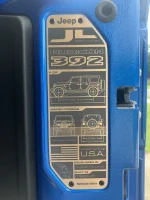
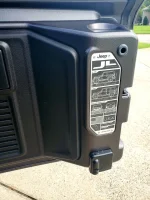
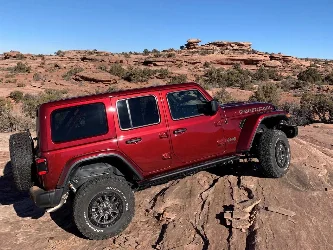
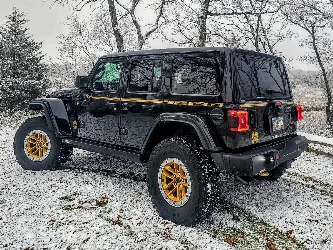
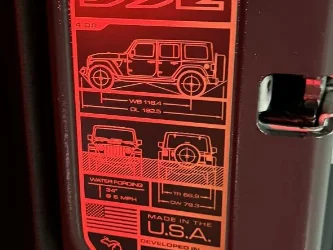
Tail gate inner 392 plate

Hmmm... Ya, I probably could have pursued them covering the costs to install the plate, but like you, I really haven't a desire to remove my old penny plate. If I'm to pick a battle that just didn't seem like a good battle to choose and if I really wanted I could simply do it myself. Besides, I already had them replace my left font inner fender as it melted down to where it rubbed on top of my tire, I choose that battle though, lol.

If you find a cool spot for your new plate please let me know, I'll do the same. I don't suspect I'll be getting my new plate any time soon though. It took 2+ months for me to get two new 392 emblems I ordered. I just got them yesterday and I ordered them at the beginning of June.
Where are you installing these? Have not seen these.
 
Question to the group. I had a red dash on my last 2019 Rubicon. Paint was white, the red dash, and black seats were a great contrast in color. I have the black dash now. Does anyone know if I can order the red dash plate? If so, a part number?
Yes you can get a used set from Rubitrux.com
 
This was my response from Jeep Cares, apparently they don`t care if your Jeep went out with the wrong information on it and they refuse to correct it even though it is their mistake. This goes pretty much hand in hand with every issue that I have had with Jeep Doesn't care. $80k plus for a Jeep and because mine was built prior to them having the correct placard it's my problem not theirs. I hope that they read this and understand that they do not even treat the same issue consistently. One Jeep Cares rep says I`ll get you the correct one that was supposed to be installed and other Jeep Cares reps tell you top go pound sand. GREAT CUSTOMER SERVICE OF A $80K vehicle, and I can't wait to see how my 392 Recon Rubicon arrives. Thanks for nothing Jeep Cares..

US Customer Care via dfi3kd2ytg9y.j-1qsdfeay.na102.bnc.salesforce.com​

Mon, Aug 9, 9:00 AM
to me


Good morning Mr. Kolwalski,

My name is Rosemarie, I'm a case manager with Jeep Wave. I have researched your concern regarding having the incorrect tag for you Jeep.

Your vehicle was build before 6/21/21, meaning that you would have the Silver badge. If your vehicle was built after 6/21/21 you would have received the Bronze badge.

You do have the option to buy the bronze tag, you may do so by going to any of your local servicing dealerships and the sales department will be able to assist you.

Should you have any questions please reach out to Jeep Wave or your local servicing dealership.

Best Regards.
Rosemarie
Jeep Wave Case Manager
844-533-7928
2zAhfzIDeN7ksVveM5-9Y1dLB2CrM9M4XoS7oyFWtYhYrQJUyiECsDKu0vuUDoPWieU-wRx1JzQRj3OI-4_uBLsaIAsgyQukADMJJ8VDc2qrxeIZ6yZEe7duNyzbjUgc1U1o0enCfYQEqZRpVZvToGFYr1lqfqEOsSroIQ7ymBVt918=s0-d-e1-ft


ref:_00Dj01qsDF._5003Z1IB8iA:ref
 
Lol... your conversation with jeep wave was prob dignified and mature whereas mine went swiftly downhill into fbomb country when I was told I was wrong about the bronze plate... so maybe fbombs=labor and installation costs! I really should send the poor girl cookies or something.... oh well.... sooooo we wait for the bronze plate..... and wait for the perfect spot to reveal itself!

Where are you installing these? Have not seen these.
Well I haven't received mine yet. Once I have the plate in hand I'll position it in various potential places to see what looks best. Messing around with the Jeep yesterday (I took my doors off 😁) I wasn't coming up with many potential places so, fingers crossed, with a moment of epiphany it'll hit me. Wherever I decide to place it I'll be using double sided sticky tape for two reasons. 1, I may want to move it down the road. 2, I don't want to drill holes in the Jeep to rivet it on.

I was looking at the passenger side door frame, where the VIN sticker is at on the driver's side, except on the passenger side. It looks like I'd have to bend the plate to mold it into place so I think that's a No Go. I'm just going to keep plate placement in mind. I don't expect to get the plate for at least a month, this giving me a little time for the light to come on.

Credit to Tomelis, I 'stole' this picture so you can see it.
 

Attachments

  • Bronze Data Plate.webp
    Bronze Data Plate.webp
    197.9 KB · Views: 116
Last edited:
Well I haven't received mine yet. Once I have the plate in hand I'll position it in various potential places to see what looks best. Messing around with the Jeep yesterday (I took my doors off 😁) I wasn't coming up with many potential places so, fingers crossed, with a moment of epiphany it'll hit me. Wherever I decide to place it I'll be using double sided sticky tape for two reasons. 1, I may want to move it down the road. 2, I don't want to drill holes in the Jeep to rivet it on.

I was looking at the passenger side door frame, where the VIN sticker is at on the driver's side, except on the passenger side. It looks like I'd have to bend the plate to mold it into place so I think that's a No Go. I'm just going to keep plate placement in mind. I don't expect to get the plate for at least a month, this giving me a little for the light to come on.

Credit to Tomelis, I 'stole' this picture so you can see it.
Mines been in for 3 weeks but I’m waiting on the Black rivets which are back ordered. I also haven’t decided what I’m gonna do with it.
 
I have black rivets. I can send ya some if you'd like. No $ required, just one friend to another...
That would be great but I need them to look at one of my parking sensors anyway…the back passenger corner sensor goes crazy every time I’m in reverse. I just have them turned off right now. Thanks tho
 
That would be great but I need them to look at one of my parking sensors anyway…the back passenger corner sensor goes crazy every time I’m in reverse. I just have them turned off right now. Thanks tho
I had the same issue, the parking sensors went crazy in reverse after I put on a new larger wheel/tire on the factory spare tailgate wheel mount thinking the tire/wheel must be protruding into the bumper's sensor area. In reverse could clearly see the tire taking up quite a bit off the lower area when viewing the Uconnect monitor. I thought after I got my new aftermarket mount it'd fix the issue, it did not. What I discovered is that it was not a sensor persay, at least not one of the sensors in the bumper. It was the actual camera that was sensing!

The camera was reacting to the tire taking up some of what's displayed on the screen, the tire was protruding a little beyond [towards the front of the Jeep] relative to the red line on the monitor. I then tested it. I disconnected the camera, put it in reverse with nothing behind me, and the alarms did not go off. Same scenario with the disconnected camera, I put my garbage bin behind the vehicle and it did go off once I started to get close to the bin, the bumper sensors worked as they should. I then realized it was the camera, it 'sensed' as well.

So... I removed the camera and manipulated it to where the tire was only barely seen at the bottom of the screen, which pushed the red warning line away from the vehicle a bit further, the tire was below the red warning line when viewing the monitor. I then glued the camera into place. Problem was solved!!! It only alerted when something truly was behind me.

Now, prior gluing the camera I did mess with the camera a bit to keep the red line as close to the vehicle with as little but still adequate clearance as possible while also keeping the left and right green guide lines perfectly straight. But again, once I had the camera set up with little visual tire interference on the display I no longer had crazy false alerts. Be sure to keep the steering wheel perfectly straight when setting the camera. To this day it's been working great.

IF you're having the same issue perhaps perform a quick easy test. Simply unplug the rear camera and see if the crazy alerts stop while nothing is behind you. With the camera still disconnected put something 15' behind the vehicle then start backing into the item. If it only starts to alert once you get close you then know it's a camera issue.
 
I had the same issue, the parking sensors went crazy in reverse after I put on a new larger wheel/tire on the factory spare tailgate wheel mount thinking the tire/wheel must be protruding into the bumper's sensor area. In reverse could clearly see the tire taking up quite a bit off the lower area when viewing the Uconnect monitor. I thought after I got my new aftermarket mount it'd fix the issue, it did not. What I discovered is that it was not a sensor persay, at least not one of the sensors in the bumper. It was the actual camera that was sensing!

The camera was reacting to the tire taking up some of what's displayed on the screen, the tire was protruding a little beyond [towards the front of the Jeep] relative to the red line on the monitor. I then tested it. I disconnected the camera, put it in reverse with nothing behind me, and the alarms did not go off. Same scenario with the disconnected camera, I put my garbage bin behind the vehicle and it did go off once I started to get close to the bin, the bumper sensors worked as they should. I then realized it was the camera, it 'sensed' as well.

So... I removed the camera and manipulated it to where the tire was only barely seen at the bottom of the screen, which pushed the red warning line away from the vehicle a bit further, the tire was below the red warning line when viewing the monitor. I then glued the camera into place. Problem was solved!!! It only alerted when something truly was behind me.

Now, prior gluing the camera I did mess with the camera a bit to keep the red line as close to the vehicle with as little but still adequate clearance as possible while also keeping the left and right green guide lines perfectly straight. But again, once I had the camera set up with little visual tire interference on the display I no longer had crazy false alerts. Be sure to keep the steering wheel perfectly straight when setting the camera. To this day it's been working great.

IF you're having the same issue perhaps perform a quick easy test. Simply unplug the rear camera and see if the crazy alerts stop while nothing is behind you. With the camera still disconnected put something 15' behind the vehicle then start backing into the item. If it only starts to alert once you get close you then know it's a camera issue.
Perhaps I'll create a new thread incase anyone else is having this issue as this is not a Plate related topic...
 
Last edited:
Well I haven't received mine yet. Once I have the plate in hand I'll position it in various potential places to see what looks best. Messing around with the Jeep yesterday (I took my doors off 😁) I wasn't coming up with many potential places so, fingers crossed, with a moment of epiphany it'll hit me. Wherever I decide to place it I'll be using double sided sticky tape for two reasons. 1, I may want to move it down the road. 2, I don't want to drill holes in the Jeep to rivet it on.

I was looking at the passenger side door frame, where the VIN sticker is at on the driver's side, except on the passenger side. It looks like I'd have to bend the plate to mold it into place so I think that's a No Go. I'm just going to keep plate placement in mind. I don't expect to get the plate for at least a month, this giving me a little for the light to come on.

Credit to Tomelis, I 'stole' this picture so you can see it.
So we dont like the idea of putting it on the plastic next to the silver?
 

Attachments

  • 20210826_102048.webp
    20210826_102048.webp
    293.4 KB · Views: 117
That would be great but I need them to look at one of my parking sensors anyway…the back passenger corner sensor goes crazy every time I’m in reverse. I just have them turned off right now. Thanks tho
Do you still have the original spare tire or have you installed a larger one?
 
Well I haven't received mine yet. Once I have the plate in hand I'll position it in various potential places to see what looks best. Messing around with the Jeep yesterday (I took my doors off 😁) I wasn't coming up with many potential places so, fingers crossed, with a moment of epiphany it'll hit me. Wherever I decide to place it I'll be using double sided sticky tape for two reasons. 1, I may want to move it down the road. 2, I don't want to drill holes in the Jeep to rivet it on.

I was looking at the passenger side door frame, where the VIN sticker is at on the driver's side, except on the passenger side. It looks like I'd have to bend the plate to mold it into place so I think that's a No Go. I'm just going to keep plate placement in mind. I don't expect to get the plate for at least a month, this giving me a little for the light to come on.

Credit to Tomelis, I 'stole' this picture so you can see it.
One of the rear pillars would be a nice spot, especially when the top is off. Curve the plate a little to conform to the pillar and use double sided tape.
 
I just received my 392 three days ago and it has the correct plate on it.
 
Mine rolled out mid July and picked it up 6 days ago. It has all the matching bronze pieces it should have, and the correct dash color. Just curious, and this is off subject, but how many of you got the cool little personalized note printed on your window sticker?
"This vehicle was built especially for FIRST NAME MI LAST NAME".
I was surprised to see my first middle initial and last name printed on the sticker.
My new 392 has my name on sticker also. My 2016 JKU had it also. Kinda cool when I sold it, shows I’m the original owner.
 
Mine rolled out mid July and picked it up 6 days ago. It has all the matching bronze pieces it should have, and the correct dash color. Just curious, and this is off subject, but how many of you got the cool little personalized note printed on your window sticker?
"This vehicle was built especially for FIRST NAME MI LAST NAME".
I was surprised to see my first middle initial and last name printed on the sticker.
My name was on the window sticker as well, pretty cool.

When you say it had all the matching bronze pieces as it should, is there something else that was missing/inaccurate on the initial 392s that rolled out?
Thanks
 
My name was on the window sticker as well, pretty cool.

When you say it had all the matching bronze pieces as it should, is there something else that was missing/inaccurate on the initial 392s that rolled out?
Thanks
I read a few things here in the forums. I think some were saying their interior dash piece was black and not gray and others didn't have the correct plate on the tailgate. So I was just saying mine seemed to match the way it should.
 
I read a few things here in the forums. I think some were saying their interior dash piece was black and not gray and others didn't have the correct plate on the tailgate. So I was just saying mine seemed to match the way it should.
No its all about the 392 bronze badge missing.
 

Create an account or login to comment

Join now to leave a comment enjoy browsing the site ad-free!

Create account

Create an account on our community. It's easy!

Log in

Already have an account? Log in here.

Back
Top