Tazer JL issue, anyone else having?- RESOLVED

It’s all good.

I get it, your pricey vehicle is down for the count and you start questioning every mod you have, trying to find the culprit. You know you have this complex little black box that nobody (but me) knows exactly how it works so it’s gotta be that… makes sense to think that anyway.
Believe me, with 10+ cars bought for development over 15 years, bricking each one at some point or another as I develop, I can remember several times where I thought I caused a problem when it was really something unrelated.

So yes I get the frustration. We get tons of customer service requests daily so we’ve slowly staffed up and now have several people on full time (Scott R is one and I believe he posted here somewhere). It’s a lot to learn, and I don’t think I could ever get anyone fully up to speed as it’s too much info, but 90% of the questions we get we have seen many times before. Heck 75% of them are a full reboot and 2 sleep cycles away from fully functioning.

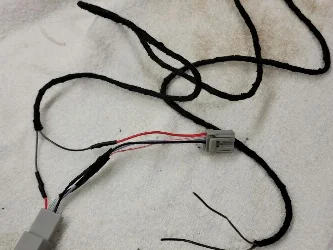
If one other person ends up with a black screen and sees this thread and then knows to check the connector and fixes the issue then it’s all worthwhile.
 
It’s all good.

I get it, your pricey vehicle is down for the count and you start questioning every mod you have, trying to find the culprit. You know you have this complex little black box that nobody (but me) knows exactly how it works so it’s gotta be that… makes sense to think that anyway.
Believe me, with 10+ cars bought for development over 15 years, bricking each one at some point or another as I develop, I can remember several times where I thought I caused a problem when it was really something unrelated.

So yes I get the frustration. We get tons of customer service requests daily so we’ve slowly staffed up and now have several people on full time (Scott R is one and I believe he posted here somewhere). It’s a lot to learn, and I don’t think I could ever get anyone fully up to speed as it’s too much info, but 90% of the questions we get we have seen many times before. Heck 75% of them are a full reboot and 2 sleep cycles away from fully functioning.

If one other person ends up with a black screen and sees this thread and then knows to check the connector and fixes the issue then it’s all worthwhile.
I just want to know why you guys didn’t utilize the left side of the controls with the “arrows” and “OK” buttons.
I’m thinking there was a programming conflict?

as for the information, I scaled, printed and laminated an instruction sheet to keep in the Jeep. 🤓
 
I just want to know why you guys didn’t utilize the left side of the controls with the “arrows” and “OK” buttons.
I’m thinking there was a programming conflict?

as for the information, I scaled, printed and laminated an instruction sheet to keep in the Jeep. 🤓
While I can listen for the buttons being pressed (almost any button in the vehicle) and I can make the Jeep THINK a button was pressed, I generally can’t make the Jeep think a button WASNT pressed when it really was. Those buttons on the left make the dash change screens so if I can’t suppress that then it doesn’t help much. Fortunately that left arrow doesn’t really do anything when you’re on the audio screen so it was usable.
I’m also trying to maintain commonality in Tazer function across multiple vehicles (Charger, Challenger, Grand cherokee, Rams, Jeeps, etc) so I’m using button combos that work on all. There are some instances in some vehicles where I could make use of other ones like the unused garage door buttons (if you don’t use all 3) or the SOS/help buttons that generally go unused if you don’t keep the subscription going.
The ONE set of buttons in the Jeep in particular that I would like to read and/or “press” are the Aux buttons but for some reason those aren’t broadcast on the bus.
 
Tazer Mini JL Issue:

Vehicle is a 2021 Jeep Rubicon 392.

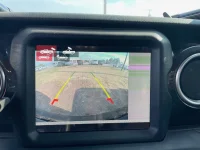
The radio’s volume cuts off and on continuously ONLY while the ignition is in the run position. Also, when the vehicle is in reverse the camera/Uconnect display is showing the entire picture; however, it’s only displaying on the left 3/4ths of the screen (see pic).

I have the latest firmware version dated 8.22.22, version “Tazer JL 11.3.9”.

I have unmarried & remarried the Tazer, reset the Uconnect system to factory, (actually, reset both systems several times, the Tazer & Uconnect system), and of course ran the two sleep cycles after altering the settings mentioned below. Also, I disconnected the Jeep’s battery for 2 hours. No positive results prevailed.

What I did. After updating to version 11.3.9 I messed with the rear camera [cargo] settings and some other settings.?. The rear camera setting was to have the rear camera turn on while using the blinker and another setting was to have the ability switch between the front and rear camera, with the toggle selector/icon on the display screen [if I recall correctly] and now there’s two selector sets (again, please see pic). I did ‘play’ with some other settings but don’t recall at this moment which ones exactly, the Daytime Running Lights was one of the settings, anyways… NOTE TO SELF: Only change one setting at a time and Always validate there aren’t any glitches with that setting prior altering or moving on to another setting.

As of this moment the Tazer is still Married; however, is not plugged in, and the issue still remains. This leads me to believe it is a Vehicle Setting, as those settings remain in play even after the Tazer is removed.

Any advice? What setting did I enable/disable or turn off or on (or change altogether) that I shouldn’t have?

Thanks in advance!

V/R

~justin
 

Attachments

  • Uconnect Image Tazer Setting Issue.webp
    Uconnect Image Tazer Setting Issue.webp
    130.1 KB · Views: 47
  • TazerJLMiniUserGuide1137.pdf
    TazerJLMiniUserGuide1137.pdf
    791.1 KB · Views: 96
While I can listen for the buttons being pressed (almost any button in the vehicle) and I can make the Jeep THINK a button was pressed, I generally can’t make the Jeep think a button WASNT pressed when it really was. Those buttons on the left make the dash change screens so if I can’t suppress that then it doesn’t help much. Fortunately that left arrow doesn’t really do anything when you’re on the audio screen so it was usable.
I’m also trying to maintain commonality in Tazer function across multiple vehicles (Charger, Challenger, Grand cherokee, Rams, Jeeps, etc) so I’m using button combos that work on all. There are some instances in some vehicles where I could make use of other ones like the unused garage door buttons (if you don’t use all 3) or the SOS/help buttons that generally go unused if you don’t keep the subscription going.
The ONE set of buttons in the Jeep in particular that I would like to read and/or “press” are the Aux buttons but for some reason those aren’t broadcast on the bus.
I know what u did and can step you through fixing it but most important is please explain the radio cuttng in and out as that is my main issue also.
 
Justin,
I’m assuming that the Tazer has been in and married and working fine before this all happened. That looks like a classic case of a defective radio. The unmarry/full reboot/2 sleep cycles would have returned all to stock, and if it was still happening it doesn’t have anything to do with settings.
I would suggest to unmarry and remove the Tazer and bring it to the dealer, you’ll either end up with a new radio or new CVPM (surroundview processor) but most likely the radio.
 
Justin,
I’m assuming that the Tazer has been in and married and working fine before this all happened. That looks like a classic case of a defective radio. The unmarry/full reboot/2 sleep cycles would have returned all to stock, and if it was still happening it doesn’t have anything to do with settings.
I would suggest to unmarry and remove the Tazer and bring it to the dealer, you’ll either end up with a new radio or new CVPM (surroundview processor) but most likely the radio.
Thank You for the reply. Yes, the Tazer was working well before all this happened. Later this evening I'll unmarry the Tazer and see if the problem is still persistent. If so off to the dealership I'll go.

My senses tell me I altered something I shouldn't have though.
I'll follow up once I know more. I read that there are/were some issues with the Tazer when the rear camera settings are altered.
 
Thank You for the reply. Yes, the Tazer was working well before all this happened. Later this evening I'll unmarry the Tazer and see if the problem is still persistent. If so off to the dealership I'll go.

My senses tell me I altered something I shouldn't have though.
I'll follow up once I know more. I read that there are/were some issues with the Tazer when the rear camera settings are altered.
I dont know that you altered something you shouldn't have. The Tazer gives you access to settings, they should not cause the problem you are experiencing.

When I read your first post here I was wondering if you have removed the Tazer, unmarried and then re-set to factory settings. I'm still unclear if you have but that is where I would have started.
 
Thank You for the reply. Yes, the Tazer was working well before all this happened. Later this evening I'll unmarry the Tazer and see if the problem is still persistent. If so off to the dealership I'll go.

My senses tell me I altered something I shouldn't have though.
I'll follow up once I know more. I read that there are/were some issues with the Tazer when the rear camera settings are altered.

In all the years I’ve messed with these I have never seen any way to mess up a radio in that way but I have seen radios go bad plenty.
I have another update for the Tazer coming real soon that I’m excited about, but I’m not going to say why 😬
 
Hold the right arrow and tap one of the cruise buttons and it’ll show you what it’s mapped to (no function meaning it’s not mapped). Hold that right arrow and keep pressing the cruise button to change its mapping.
Ok, update from me here.
It wasn’t dark mode.
For some reason it was starting light shows when trying to activate cruise buttons and then it would turn the show off which was the reboot.
I wasn’t holding the left side to activate the quick button, but regardless I unbound all the right side on the wheel and it’s working perfectly no issue since you posted this and I unbound the hot keys.
Thank you.
 
In all the years I’ve messed with these I have never seen any way to mess up a radio in that way but I have seen radios go bad plenty.
I have another update for the Tazer coming real soon that I’m excited about, but I’m not going to say why 😬
Looking forward to the update!
 
In all the years I’ve messed with these I have never seen any way to mess up a radio in that way but I have seen radios go bad plenty.
I have another update for the Tazer coming real soon that I’m excited about, but I’m not going to say why 😬
UPDATE: So, I unmarried the Tazer, went thru the 2 cycles [I actually did 3 this time]. I then left the vehicle alone for a bit, taking the FOB with me, then went back in and married it up. All is working Great Now!!!
(Scott R did get back with me on a separate communication, stating my correct radio size was probably not selected [8.4]. None-the-less, the method/steps I went thru mentioned here fixed it all and I never had to fix the radio size. (I swear I did all that before, except for isolating the FOB. A mystery it is.?.?.)
Thank You for your assistance!!!
 
I Hope the Update is to, "... To have the ability to leave the vehicle's WiFi on when the vehicle is completely turned off...".

I submitted the below suggestion to Z Automotive last May. Fingers Crossed

INITIAL REQUEST 19 May 2022

What would be really really really cool. To have the ability to leave the vehicle's WiFi on when the vehicle is completely turned off. If there were a way to turn only that system on in a manner that conserves battery draw. The vehicle/Jeep would appear to be completely off (although we know it's never truly off - as it patently waits/senses an action from our FOB or from a Uconnect command via our phone app).
I have a data plan for my Jeep with AT&T. I also have a camper trailer. When I'm out in the wild camping for the weekend I like to set up the Firestick TV for the kids so they can be entertained during their downtime just before bed. (Which gives me and the lady a little adult time, yes I have my motives as well ;) ) Also, I have a WiFi camera with night vision on the camper to monitor/record things happening at our site while we're sleeping, providing some peace of mind.
Verse having to turn my phone's hot spot on and leaving it in the camper, which does me no good if I want to walk down to the lake and have my phone on me, having everything connected to the Jeep's WiFi would provide me real-time campsite video regardless of where I'm at on the campground. I would pay for that capability!!!
Something to consider.
Thanks for listening.
~justin
___________________________________________________________________________
On Mon, 23 May at 11:56 AM , Blakeslee, Justin <justin.blakeslee> wrote:

Hello Scott,
Thank You for the reply. Perhaps you can include this additional verbiage within the feature request worksheet. I’m sure the engineers would consider this, but just to be on the safe side.

From a security standpoint I certainly would not want a 'night creeper' to walk past my Jeep 392 and see that the ignition's push button accessory/run light is on (even though the FOB is not in the Jeep) or that the radio's screen is on or lit, even if it's set to the dimmest setting. Aside from the battery draw from a dimly lit screen or ignition light [and applicable energy consuming background systems], that alone may make the would-be thief want to start tampering with the vehicle. Also, I would want to be able to activate my aftermarket car alarm. (With newer vehicles, aftermarket alarms are digital, wired to CAN/OBDII port).
Basically, if there were some way to activate only the WiFi HotSpot system [and if required, supporting sub-systems] leaving no sign that anything else on the vehicle is running, except for my alarm's blinking LED of course.

Perhaps a specific sequence of pushing certain buttons in the vehicle, or better, pushing a specific sequence of buttons on the FOB could activate/deactivate the WiFi as the latter method would negate having to physically go to the vehicle to activate/deactivate the WiFi Hotspot [as I sit in my camper trailer]. Or, if there were a Tazer setting to keep the WiFi on for X amount of time. (I’d want to set mine at least from evening to morning, ~12 hours.)

Obviously, I would not want WiFi on all the time, unless it's a very small battery draw.

Again, Thank You for your time & consideration.
V/R
~justin

__________________________________________________________________________
Hi Justin,

I updated the information in the worksheet to include a duration of time and shortcut key to disable. Also dash lights off. Thanks for additional details and hope they can add this in the future features.

Thanks,
Scott R.
Z Automotive Technologies
 
I've never owned a Tazer, but I have done more than a decade of remote troubleshooting with (often, very unhappy) customers in the field. If they're calling me, the stakes are high and they're blaming my product for a *big* failure.

I just want to chime in on this thread and say I am absolutely blown away by the sheer professionalism demonstrated by @justjoez here. What a (pardon my french) fucking BADASS he is for how he handled this situation.

Hats off from one nerd to another. This guy here knows his product (and the systems with which it integrates). It just needed to be said out loud.

Not gonna lie, I'll probably buy a Tazer based off this interaction alone. Cheers Joe!


View attachment 6418
Yup, Joe is the real deal!
 
@Smess - finally catching up on all the 392 threads this evening and I've come across many, many posts by you regarding this issue. I totally understand your frustration, and it's clear that making noise about the issue you were having did, in fact, get Joe's attention and got your issue resolved.

But, it's important to acknowledge, publicly, the problem was NOT Tazer's/Joe's fault. They also certainly weren't ransoming anyone's vehicle, and there aren't any known issues with the firmware update.

Considering the degree to which you put Tazer (and Joe personally) on blast (especially in regards to the "$50 ransom" accusations), I think it'd be only fair to for you to go back and either remove the inaccurate/inflammatory parts of those posts, or add an edit to the top of the those posts describing that the issue was NOT with the Tazer.

One easy way to do that would be to put a link to the post of the solution (like this) into the TOP of those posts for posterity.

People use (and will continue to use in the future) the search on this forum for issues when they have problems, and you want to point people towards a solution, not lead them down an angry rabbit hole. I frequently find 10+ year old posts on forums when I'm looking for troubleshooting solutions, so save future generations the pain/trouble, and do right by @justjoez !

Again, it's totally understandable to be upset about support not getting back to you, and to be upset that your emails were found in joe's spam folder. That would frustrate me endlessly too. But here's the man himself coming into the forums to fix an issue that he didn't cause, and doing it with class, so I think it'd be the least you could do to put things square.

All the best to everyone and super glad that the issue was resolved!
And where do you see these things that you are referring to?

And btw the ransom was a comment that was made by someone else that I repeated, it was not something that I made up.

Did you see how this thread started and what it said? do you see what it says now?

SORRY FOR INTERUPTING THAT WAS A QUICK SIDEBAR TO DOG, EVERYONE ELSE PLEASE IGNORE
 
Last edited:
Tazer Mini JL Issue:

Vehicle is a 2021 Jeep Rubicon 392.

The radio’s volume cuts off and on continuously ONLY while the ignition is in the run position. Also, when the vehicle is in reverse the camera/Uconnect display is showing the entire picture; however, it’s only displaying on the left 3/4ths of the screen (see pic).

I have the latest firmware version dated 8.22.22, version “Tazer JL 11.3.9”.

Thanks in advance!

V/R

~justin

Justin- what ever happened to the radio cutting out issue?

my radio goes for 5-6 seconds and then cuts out and then runs another 5-6 and on and on

It does it in every mode, an, fm, sat radio, itunes, you name it.

The only thing I can figure is it has to be in the extension that you plug in to when going back to stock, I had this once before with a Ram but it was only sat radio and it ended up being the antenna

any help would be appreciated
 
Justin- what ever happened to the radio cutting out issue?

my radio goes for 5-6 seconds and then cuts out and then runs another 5-6 and on and on

It does it in every mode, an, fm, sat radio, itunes, you name it.

The only thing I can figure is it has to be in the extension that you plug in to when going back to stock, I had this once before with a Ram but it was only sat radio and it ended up being the antenna

any help would be appreciated
Good Morning @Smess

I had an Update in a previous message where my issue was resolved; however, I elaborate a bit more.

Previous message, "
UPDATE: So, I unmarried the Tazer, went thru the 2 cycles [I actually did 3 this time]. I then left the vehicle alone for a bit, taking the FOB with me, then went back in and married it up. All is working Great Now!!!
(Scott R did get back with me on a separate communication, stating my correct radio size was probably not selected [8.4]. None-the-less, the method/steps I went thru mentioned here fixed it all and I never had to fix the radio size. (I swear I did all that before, except for isolating the FOB. A mystery it is.?.?.)
Thank You for your assistance!!!"
_________________________


Expanding on that I'll say it was user error/my error. Your symptoms are the same as what I was having. I believe I did not Fully or Completely unmarry the Tazer in my attempt to 'start from fresh'. Perhaps I only performed 1 cycle after the Unmarry. Perhaps I cut the 2nd cycle short.? Either way, my senses lead me to believe I did not fully clear/remove the Tazor's settings, or rather, I did not fully reset the Jeep to its factory settings.
Performing what I stated in the Update fixed everything.

Note: The closing of the door thing was a little confusing in the instructions to my simple mind. Unlike my previous attempts, this time I left my door open while rebooting [and listened to the open-door ding]. After the countdown/reboot... [here's my 1st cycle] I first turned the ignition to Off, waited ~10 seconds, then closed the door. Once the display went black, I put the ignition in the Run position [and gave enough time for everything to boot back up] then I opened the door. I then [my 2nd cycle] put the vehicle in the off position, waited ~10 seconds, and then closed the door. Just to be on the safe side I performed a 3rd cycle, figured it couldn't hurt.
Prior the reboot I started thinking that maybe I ran thru my cycles too quick. So, with this last go-around, I ensured I allowed enough time for everything to fully power up after turning the ignition to Run [for each cycle] prior switching the ignition to the Off position.


(I also have an extension cable, that was not a contributing factor regarding my issue.)
 
Yes, if you go to dealer and they plug in to obd2 which they always do your done.

DO NOT UPGRADE THE FIRMWARE

the newest firmware update has made it so when you unmarry you get a black screen.

it could be the beginning of the $50 extortion you pay to unmarry, it appears that way.
It`s not just Jeeps that get hit with that charge, I have a SCT tuner for my Raptor and I can tell you it cost nothing to un-marry
The cost of the tunes that are out there get pretty pricey. When I upgraded to a different tuner all had to do is pull the current tune out and re install the factory tune and then I sold the tuner with all of the tunes in it. They {tuner companies} will take the software from the new truck onto the tuner and apply the tunes that were in the SCT tuner to work with the new truck.
I wish that my 21 JL XR 392 would have the same gains as my Raptor did.
 

Create an account or login to comment

Join now to leave a comment enjoy browsing the site ad-free!

Create account

Create an account on our community. It's easy!

Log in

Already have an account? Log in here.

Back
Top