Radar Detector and Dash Cam

Won't the camera on the Wolfbox mirror be blocked by the the box on the windshield. Or are you going to just use the camera that mounts on the bumper or wherever as the front 'dash cam'?
I'm not yet 100% sure, but the Wolfbox mirror/display is really wide. I'm hoping to skew it to the side the cameras is on, enough to get it past the edge of the box. It might be partially obstructed by the box, but I think I can get some forward coverage, otherwise, yes, I'll depend a bit on the other two cameras for coverage.

My main goal was to get a better replacement for the mirror I can't really see out of anymore. The factory backup camera needing to be manually engaged, and the image taking over the main display when in use were limitations I was trying to overcome. Having a front facing dash cam was just a bonus I was looking to get since I was asking hardware anyway.

I have not dug into it yet, but I'm hoping to hack the video line from the front camera to swap it out for a thermal/nightvision camera, eventually. I often see a hundred or more deer, antelope, etc. on the way to town every time. Plus I live in an area with tons of cattle and horses that sometimes get out and on the road. Plus, thermal sounds cool.
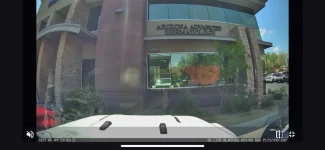
 
So I went out and gave it a test fit.

Here's a pic of the Wolfbox alongside the factory mirror:

IMG_5177.webp


Here's a shot of it mounted to the stock mirror mounting stem using my modified ram "dogbone" arm:
IMG_5178.webp


And here's a shot of it from through the glass:
IMG_5179.webp


I think it's offset enough to work well enough. The only glaring issue I see right now is that using my visors with it in that position is not looking so great. I might, however, be able to use a longer arm to move a bit further away from the "box" to gain clearance to better use the visors... Since I won't be using the "mirror" function and only using the video for rear view, the angle it sits at is not important. I might even be able to relocate it to the overhead rack.
 
Great pics and ideas @guruman Do you mind taking a screenshot of the view from the front cam? is the black box interfering with the camera's field of view?
 
Here's how my radar detector is installed. I wanted it to be:
- easily visible to me
- not easily visible to a cop from behind at night
- as much as out of the way as possible and not interfering with any thing
- as high as possible for max range

rd - 1.webp

rd - 2.webp

The power is from the key-on aux wires and the remote screen is between the console and the shifter unit, tidy and out of the way but easily and discreetly mute the sound/screen if pulled over. Forgot to take picture.

As far as a camera, I've went with a BlackVue BOX set-up because it met these requirements:
- provide cellular connectivity for 24/7 monitoring
- be discreet and small (thus the Box version)
- clear the damned center black box
- have the newest SONY sensor for both front and rear camera
- have an easy way to record (mark) video manually (see the big round button on the side of the black box)

rd - 3.webp

rd - 6.webp


and here are sample image showing the fields of view for the FRONT:
1749073509626.webp

and REAR camera:
1749073463941.webp


-
 

Attachments

  • rd - 7.webp
    rd - 7.webp
    57.3 KB · Views: 23
Great pics and ideas @guruman Do you mind taking a screenshot of the view from the front cam? is the black box interfering with the camera's field of view?
I will, eventually. Right now it's just mounted to the stem. I still have to run the two camera, power and GPS wires to make it all work.

With the wide angle lens, I'm 100% sure the box cuts off the image a bit, even more so if I move it out of the way of the visor. Perfect? no. Good enough, maybe.

I'll report back, but it'll be a few days at least, my dance card is full of non-Jeep stuff.
 
The space above the mirror looks like it would be an idea place to mount radar detector as is would be out of the way and not clutter anything up. Finding a mounting solution for this is another story.......

I've never had a radar detector, but now considering one. You folks are causing me to spend more money with all these ideas for jeep mods. Fun vehicle to mod though. And it is hard to keep this thing under the speed limit on a lot of roads.
I just use Waze and cross fingers
 
Here's a short 4k clip from the camera on the mirror head. The "box" blocks it a bit, but it's somewhat functional. Once I get the bumper camera adjusted properly it'll be a bit redundant, although. I'm considering mounting the bumper camera on top of the front bumper skid plate facing rearward as a "rock monitor" to give me running view of the underside. We'll see.

I apologize for the dirty windshield, it's bug season in Wyoming.

Thanks. It's a shame that Wolfbox doesn't offer a remote cam for their front view one like some other manufacturers do.
 
Thanks. It's a shame that Wolfbox doesn't offer a remote cam for their front view one like some other manufacturers do.
It's worth noting that in this position, I have the mirror pushed way up so that the "box is the first thing to obstruct my view, and the visors still function without hitting it. It could definitely go lower, and in the stock position, would have a better view to the right, as that camera would be slightly below the box.

Overall, I'm pretty happy with it, the interface is a little wonky (it seems to lack the mountain time zone... only offering "Arizona" and Pacific time, but no true Mountain time). But, the displayed image is incredible, and recording all three cameras at once makes capturing those wheeling moments easier, you know, for the 'Gram.
 
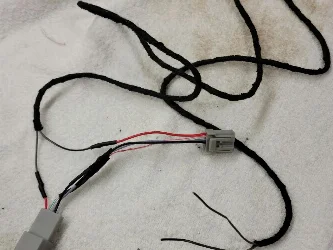
Just saw this thread, so sorry if I'm behind the power curve on this. I installed my Blackvue DR900X - 2CH last night. For power, I removed the access plate behind the rearview mirror on the small overhead console that houses the adaptive cruise control and collision warning system. I unplugged the connector and, using wire taps, tapped into the reddish (power) wire and black (ground) wire with the connections provided in the dashcam power cable.

The power cable that comes with the DR900X is approximately 4ft. long, so I had to shorten it up a bit. After I connected and tested, I put everything back together and it works like a champ. For the rear camera, I debated putting it on the rear glass, but ultimately decided to mount it on the rear "roll" bar. The cabling for that camera was simply routed along the roofline and under the removable panels.

Here's a couple of pics. I had not routed the rear camera cable yet. Also, when I use line taps, I typically wrap with electrical tape...just in case our resident electricians have a cow...:cool:.

View attachment 3328View attachment 3329
I know this is an old posting. I am not the brightest but what wires do I plug my mirror tap wires into to get 12V??
 

Create an account or login to comment

Join now to leave a comment enjoy browsing the site ad-free!

Create account

Create an account on our community. It's easy!

Log in

Already have an account? Log in here.

Back
Top