CarPlay connectivity

When you do this does the screen go blank or show any sort of reset while holding the buttons? I have held those two buttons for over 30 seconds with no indication of a reset. When I release them the screen goes blank but I dont know if that is because it is reseting or simply just turned off.
It goes blank for a couple secs then the Jeep logo comes up. Any issue I’m having at that point is resolved 99% of the time.
 
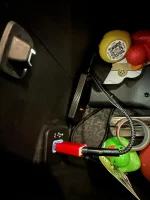
I have my wireless adapter plugged into that one in the console. Works pretty well
Same. I rarely have any issues with it. If I do, I just turn off bluetooth on my phone, wait two seconds, turn it back on, and boom it connects back flawlessly. Happens once every few months. I think I paid $100 for the adapter, well worth the money.
 
Same. I rarely have any issues with it. If I do, I just turn off bluetooth on my phone, wait two seconds, turn it back on, and boom it connects back flawlessly. Happens once every few months. I think I paid $100 for the adapter, well worth the money.
I'll get one if I ever get the wired solution working. That has to work first.
 
I'll get one if I ever get the wired solution working. That has to work first.
We can link up and I can plug mine into your center console and see if my phone links up to it. That may solve your issue, you wouldn't need the cable in the dash at all then. It's annoying though, I get it.
 
We can link up and I can plug mine into your center console and see if my phone links up to it. That may solve your issue, you wouldn't need the cable in the dash at all then. It's annoying though, I get it.
I appreciate that but I feel like if plugging my phone in there doesn't work plugging an adapter won't either. Stranger things have happened. When I got a new internet service I could no longer use my phone to control my garage door until I put the Chamberlain device on a network switch rather than wired directly to the router.
 
This is what I ended up doing that I copied from someone having similar symptoms. The CarPlay adaptor is connected using a USB-C adaptor to my regular USB port in my console. If I remember correctly, the CarPlay adaptor came with both cables and I bought the USB-C to USB adaptor on Amazon or something. Voodoo maybe, but a pretty cheap fix for me. I did start having some issues recently with it after an iPhone update but was fixed with an over the air update or something because it just went away. When I use cables, sometimes they work for a 5 hour trip and sometimes for 5 minutes.
 

Attachments

  • 1696558560027.webp
    1696558560027.webp
    74.9 KB · Views: 47
My wired connection to CarPlay had been working flawlessly on the last iOS 16 variant. Earlier releases were problematic with the active app freezing on UConnect, reconnecting, and doing it again over and over every 30 seconds. I was a happy camper once the bugs were ironed out and I could enjoy no music disruptions.

Unfortunately it began doing this all over again following the iOS 17 update. It's quite annoying to be reminded how terrible you sound while jamming to My Sharona. :sneaky:

I just turned off projection and will try again in a few months. At this point I just want my phone to charge and am fine streaming through Bluetooth.
 
My wired connection to CarPlay had been working flawlessly on the last iOS 16 variant. Earlier releases were problematic with the active app freezing on UConnect, reconnecting, and doing it again over and over every 30 seconds. I was a happy camper once the bugs were ironed out and I could enjoy no music disruptions.

Unfortunately it began doing this all over again following the iOS 17 update. It's quite annoying to be reminded how terrible you sound while jamming to My Sharona. :sneaky:

I just turned off projection and will try again in a few months. At this point I just want my phone to charge and am fine streaming through Bluetooth.
Damn you…I’m gonna have that crappy song stuck in my head all day
 
My wired connection to CarPlay had been working flawlessly on the last iOS 16 variant. Earlier releases were problematic with the active app freezing on UConnect, reconnecting, and doing it again over and over every 30 seconds. I was a happy camper once the bugs were ironed out and I could enjoy no music disruptions.

Unfortunately it began doing this all over again following the iOS 17 update. It's quite annoying to be reminded how terrible you sound while jamming to My Sharona. :sneaky:

I just turned off projection and will try again in a few months. At this point I just want my phone to charge and am fine streaming through Bluetooth.
What is projection? I have seen it in the menus and it is off but never looked into it. Does it need to be on for CarPlay?
 
What is projection? I have seen it in the menus and it is off but never looked into it. Does it need to be on for CarPlay?
Yeah, that needs to be on for CarPlay to feed into UConnect.

Once you turn that on and plug in your phone you will see an icon in the bottom icons of your display that says CarPlay. If you don't see it, unlock your phone and answer any prompts that are coming up. Once those are answered for the first time set-up it will be there.
 
Yeah, that needs to be on for CarPlay to feed into UConnect.

Once you turn that on and plug in your phone you will see an icon in the bottom icons of your display that says CarPlay. If you don't see it, unlock your phone and answer any prompts that are coming up. Once those are answered for the first time set-up it will be there.
Thank you. I just turned projection manager on. CarPlay still doesn't work and it also will not play music through USB connection, only on bluetooth. Ports charge the phone though.....
 
Thank you. I just turned projection manager on. CarPlay still doesn't work and it also will not play music through USB connection, only on bluetooth. Ports charge the phone though.....
OK,I know it's kind of basic, but I've had this happen. Check inside the port on your phone for pocket lint and gunk. I had this happen where my phone would not connect using a cable, but would charge wirelessly. I thought the port was fried. It turns out that a big wad of pocket lint had built up inside the connector on the phone. I dug it out with the pin from my Swiss Army Knife.

It's been working fine since.
 
OK,I know it's kind of basic, but I've had this happen. Check inside the port on your phone for pocket lint and gunk. I had this happen where my phone would not connect using a cable, but would charge wirelessly. I thought the port was fried. It turns out that a big wad of pocket lint had built up inside the connector on the phone. I dug it out with the pin from my Swiss Army Knife.

It's been working fine since.
I had the same issues with my previous 13 Pro as well as my new 15 Pro. The phone works in other vehicles also.
 
Thank you. I just turned projection manager on. CarPlay still doesn't work and it also will not play music through USB connection, only on bluetooth. Ports charge the phone though.....
Do you see your phones name listed as an option on the projection screen? If so, try selecting the gear icon and seeing if "Enable CarPlay" is checked.
 

Attachments

  • IMG_2072.webp
    IMG_2072.webp
    143.6 KB · Views: 46
Do you see your phones name listed as an option on the projection screen? If so, try selecting the gear icon and seeing if "Enable CarPlay" is checked.
Thanks for the help again but yes, those are checked.

IMG_9392.webp
 
I had the same thing in both my ‘20 JT and my 20A 392. Read a forum on the JL page where someone suggested a different USB cable and/or USB adapter. I bought some USB (A) to USBC adapters and switched to the braided Apple USBC cable. No issue since.

I think it really comes down to the cheap Apple USB (A) cables.

Or go with the wireless adapter like some of the suggestions above. :)
 
I had the same thing in both my ‘20 JT and my 20A 392. Read a forum on the JL page where someone suggested a different USB cable and/or USB adapter. I bought some USB (A) to USBC adapters and switched to the braided Apple USBC cable. No issue since.

I think it really comes down to the cheap Apple USB (A) cables.

Or go with the wireless adapter like some of the suggestions above. :)
I've tried two different A to C cables and three different C to C (new iPhone with USB C). Does CarPlay work on both the A and C ports in the dash?
 
I've tried two different A to C cables and three different C to C (new iPhone with USB C). Does CarPlay work on both the A and C ports in the dash?
I wonder if at some point your phone asked to "trust this device" and was set to "no" accidentally. I believe those settings would even transfer to a new iPhone.

Will someone else's iPhone connect?
 
I received the MFI approved cables, been connected without incident for a few hours. Could it be that simple?
 
I wonder if at some point your phone asked to "trust this device" and was set to "no" accidentally. I believe those settings would even transfer to a new iPhone.

Will someone else's iPhone connect?
Tried one other phone that was working in another vehicle and it did not work in my 392.
 

Create an account or login to comment

Join now to leave a comment enjoy browsing the site ad-free!

Create account

Create an account on our community. It's easy!

Log in

Already have an account? Log in here.

Back
Top